RoutineOff
Product overview

Official Windows download

Word Count Tool for Windows

Install the desktop tool that counts complete document batches, runs OCR when required, and keeps the result ready for review and export.

RoutineOffDownload for Windows

A valid Word Count Tool account is required after installation.

Word Count ToolRoutineOff for Windows
Version
1.1.4
Platform
Windows 10 / 11, 64-bit
Download size
177 MB
Released
27 July 2026
File
WordCountTool_Setup_1.1.4.exe
Word Count Tool
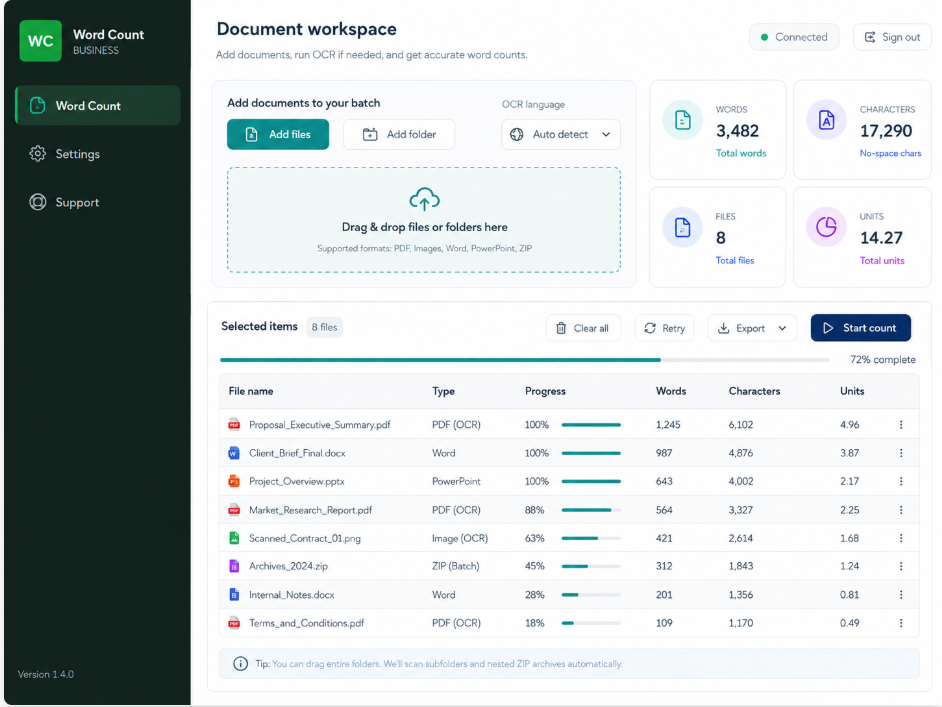
Word Count Tool interface on Windows

Guided setup

Download, install, and start in three steps.

01

Download the installer

Select the Windows download button and keep the setup file on your computer.

02

Run the guided setup

Open the setup file, choose the installation location if needed, and follow the on-screen steps.

03

Sign in to the tool

Open Word Count Tool and use the username and password issued by your administrator.

System requirements

Operating system
Windows 10 or Windows 11, 64-bit
Microsoft Office
A supported Microsoft Word installation is required for official Word-document counting and supported OCR workflows.
Internet
Required for sign-in, access validation, and application updates. Document processing runs on the computer.
Storage
At least 500 MB of available disk space

File verification

Verify the installer before you run it.

The SHA-256 fingerprint below identifies the official version 1.1.4 installer published by RoutineOff.

3c06ddf9767749f6f56c63ba758f5e4a00b7d3768432144cb1649128cc6c983a
Windows security notice

This pilot installer is not digitally code-signed yet, so Windows SmartScreen may show an Unknown Publisher message. Download only from this page and confirm the SHA-256 fingerprint before installation.

Download questions

Can I use the tool without an account?

No. The installer is public, but the application opens only with an active tool account issued by the administrator.

Are my documents uploaded to the server?

No. Document content is processed locally on the Windows computer. The server handles account and session validation.

How will I receive updates?

The installed application checks the official update channel and displays an in-app notice when a newer version is available.

Does this version work on macOS?

No. Version 1.1.4 is a Windows release.

Word Count Tool 1.1.4Windows 10 / 11, 64-bit
Download for Windows177 MB