Add the batch
Choose individual files, add a complete folder, or drag documents into the tool.
Windows desktop software for document teams
Count complete document batches without opening files one by one. Add files or folders, run OCR when needed, review the totals, and export the result.
Product preview
The tool processes supported files on the Windows computer and keeps each result visible for review.
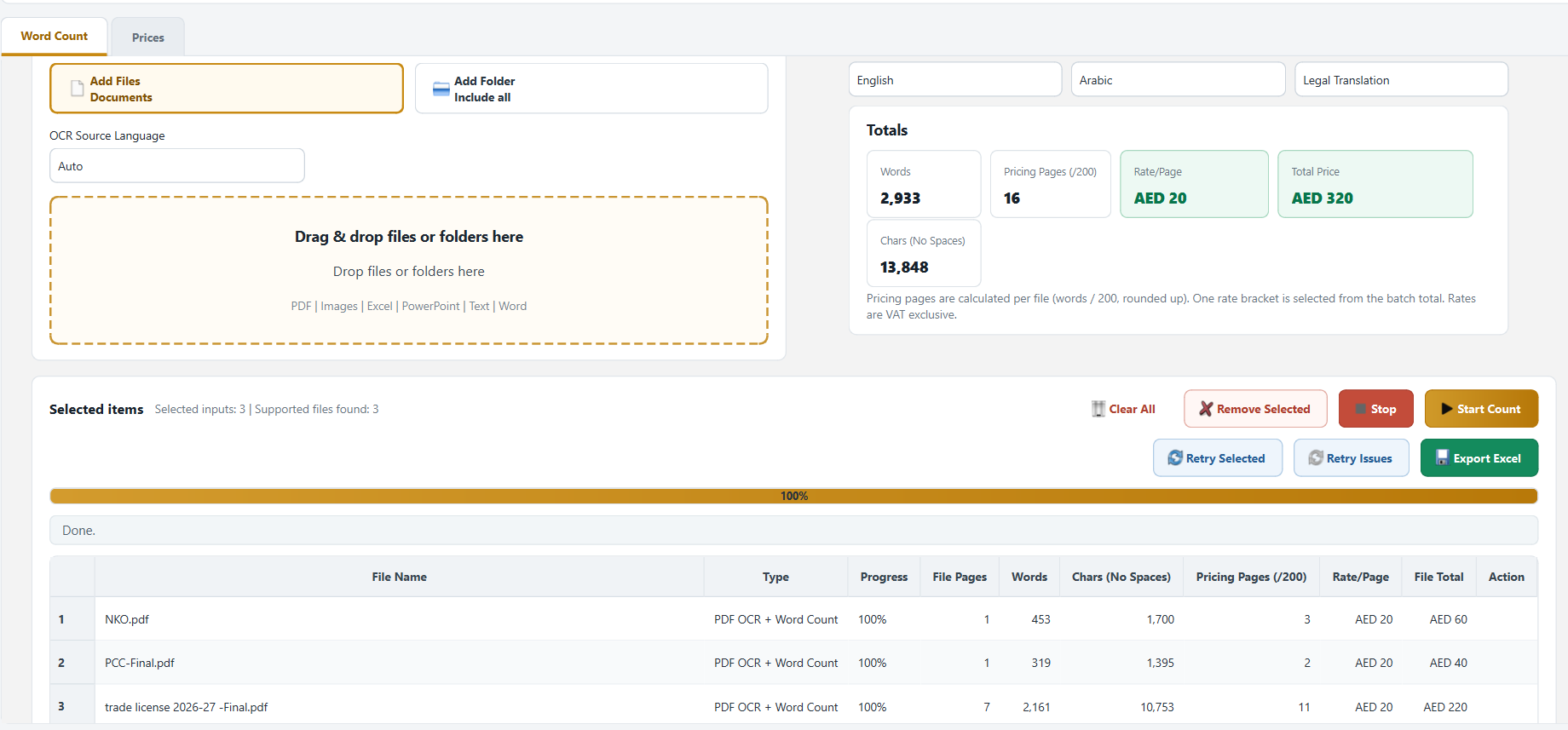
A shorter quoting workflow
Choose individual files, add a complete folder, or drag documents into the tool.
The tool reads supported documents and uses OCR for scanned PDFs and images.
See the word count, characters without spaces, calculated pages, and files that need attention.
Save a structured Excel result for quotation, checking, or internal records.
Built for real document work
Process PDF, image, Word, PowerPoint, and text files in the same run.
Files with incomplete or uncertain extraction are clearly marked instead of silently returning a misleading count.
Document content is processed on the user’s Windows computer; the access server manages sign-in and device sessions.
Each tool user has controlled access, an expiry date, and one active device session at a time.
Totals are calculated across the complete uploaded batch, with per-file detail available for review.
Export the processed result in a format that teams can review, archive, and use in quotations.
PDF, JPG, JPEG, PNG, TIFF, BMP, Word, PowerPoint, and text. Excel workbooks are reported as unsupported and are not silently included.
Simple office plans
2 tool users
3 tool users
4 tool users
Each user can have one active device session at a time. Prices shown are the planned launch prices and will be confirmed at checkout.
The first commercial release is for Windows. A separate macOS edition requires a different document-counting and installation setup.
Microsoft Word is used for official Word-document counting and for the final count in supported OCR workflows. A supported Windows edition of Microsoft Office is required.
No. Document content is processed locally by the desktop application. The account server handles sign-in, expiry, device identity, and session status.
No OCR engine can guarantee perfect extraction from every scan. The tool retries difficult pages and marks uncertain or failed files for review rather than presenting them as reliable.
Internet access is required for account validation and session control. Document processing itself runs on the Windows computer.
A tool user is limited to one active device session. Office plans provide separate users for the number of employees included in the plan.
Controlled pilot
The Windows installer is ready, but public downloads remain disabled until remote sign-in, account control, and update delivery are connected to the production server.