Start with the source
A PDF can contain text, page images, or both
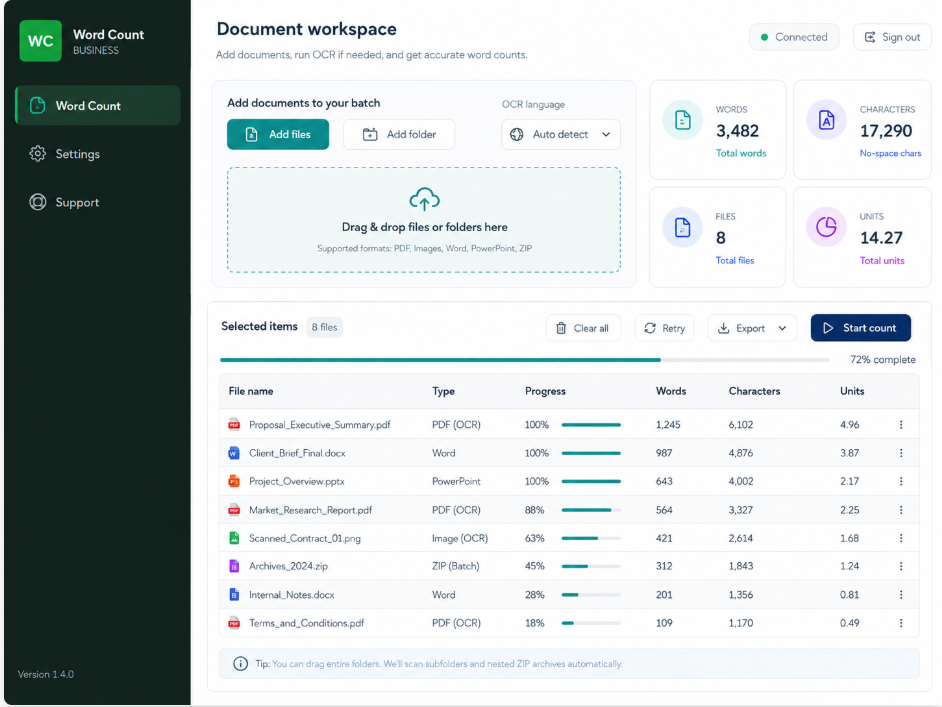
A normal text PDF exposes its characters directly. A scanned PDF may only contain photographs of pages, even when it looks identical on screen. In that case, a word-count tool must use optical character recognition before it can estimate the text.
Mixed PDFs can contain selectable text on some pages and scans on others. That is why a zero or unusually low result should be treated as a review signal, not accepted automatically.
OCR is not certainty
Image quality, layout, and language affect the result
No OCR engine can guarantee perfect extraction from every scan. Rotation, low resolution, handwriting, stamps, tables, decorative backgrounds, and multiple columns can all change the output.
Clear scans
Straight, high-contrast pages generally produce a more reliable result than blurred phone photos.
Complex layouts
Tables, sidebars, headers, and multi-column documents may require a closer file-level review.
Mixed languages
Confirm that the relevant OCR language support is available for the documents in the batch.
Warnings
Treat uncertain or failed extraction as a prompt for manual checking, not as a final count.
A safer workflow
Review exceptions before using the batch total
Run OCR only where it is needed, then compare the file status, page count, and extracted result with what you can see in the source. An empty scan, a very small number, or a warning deserves attention before the quotation is prepared.
Word Count Tool retries difficult pages and marks uncertain or failed files for review. It is designed to make exceptions visible rather than silently presenting every result as reliable.
Local document handling
The document stays on the Windows computer during counting
During normal counting and OCR, document files and their content are processed locally and are not uploaded to RoutineOff's account server. Microsoft Word is used for official Word-document counting and for the final count in supported OCR workflows.
Internet access is used for sign-in and periodic account validation. This separation helps teams review sensitive document batches without sending the files to the access service.